The problem
You’re on a distributed team. A colleague in another timezone schedules a meeting at 7 AM your time. You’re still asleep, or dropping your kids off at school, or mid-run. They didn’t do it on purpose. They could have checked your timezone, done the math, and maybe asked you when you usually start. But nobody does that for every meeting invite.
Not everyone works 9 to 5. Some people start early and wrap up by mid-afternoon. Some do their best work late at night. Others split their day with a long break in the middle for errands, exercise, or family time, then come back online later. All of these are valid. But your colleagues can’t respect a schedule they can’t see.
Most tools have a way to broadcast your working hours. But almost nobody sets them up, so the information isn’t there when people need it. The result is guesswork, timezone math, and meetings that land at impossible times.
This takes about five minutes to set up, once, across all your tools. After that, the tools do the work for you.
Google Calendar
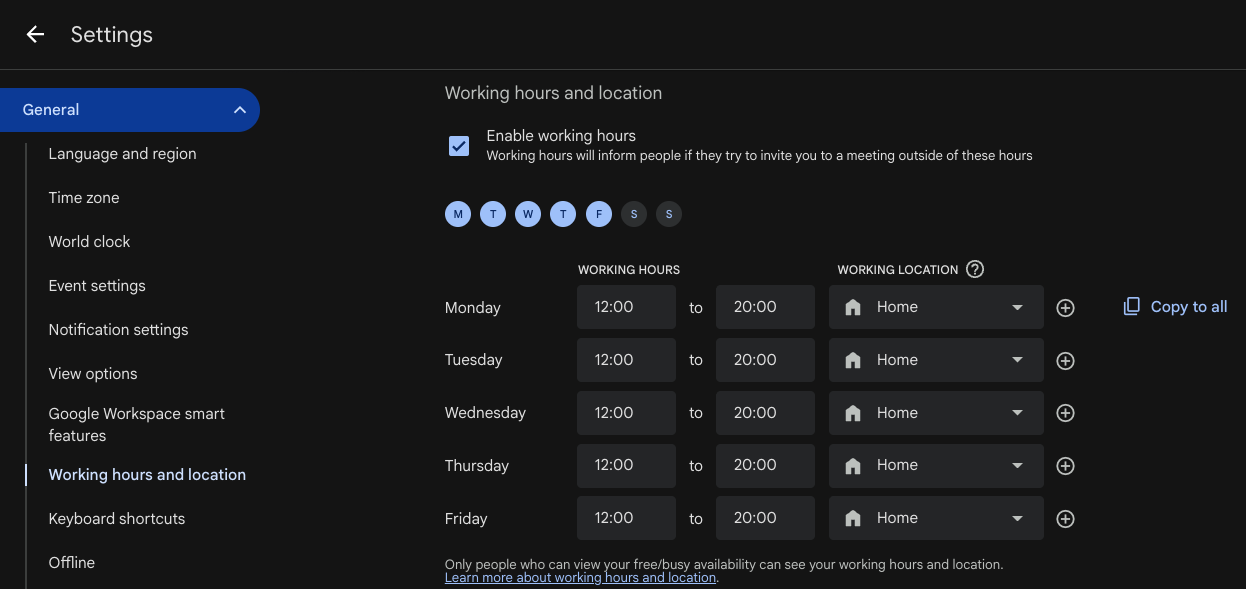
Settings > Working hours & location.
Turn on working hours, set your days and times, and confirm your timezone. Once configured, anyone scheduling a meeting with you will see a warning if the time falls outside your working hours. It doesn’t block them, but it makes them think twice.
Note: this setting is only available on Google Workspace accounts (work or school). You won’t find it on a personal Gmail calendar.
Messaging tools
Most messaging tools like Slack and Teams have similar settings for notification schedules and quiet hours. But these serve a slightly different purpose. Meetings are synchronous. You need to be there at that exact time, so a calendar warning before the invite is sent actually prevents the problem. Messages are asynchronous. You can read and reply when you’re back, on your own schedule.
Some people are fine receiving notifications outside business hours and just getting to them later. Others prefer silence until their workday starts. That’s a personal choice. But for your calendar, there should be no ambiguity: if you’re not working, you can’t be in a meeting.
Why it matters
Setting working hours isn’t about being unavailable. It’s about being predictable. Your calendar is where it matters most, because it prevents conflicts before they happen.
On an international team, this matters even more. Time zones are hard enough without having to memorize everyone’s schedule. Let the tools carry that information.
Five minutes of setup, and you never have to explain your availability again.